Introduction
As a developer, it is almost inevitable that you’ll eventually work on maintaining or modernising an existing codebase. Rarely is this straightforward; the challenge can feel overwhelming, especially if the core logic is a tangled mess and a classic ‘big ball of mud’. This lack of clarity decreases your confidence and increases the risk of the system breaking in unexpected places whenever you make changes.

What is legacy .NET code?
A common misconception is that legacy code must be old code. While age can be a factor, a system might use modern frameworks but still be poorly organised and patched together to meet a deadline. While many factors define legacy code, we’ll focus on two of the biggest ones today.
First, if the code has no tests, it is legacy. Michael Feathers1 famously defined legacy code as “code without tests” because the absence of a safety net makes changing the system risky and expensive.
Second, if the code and infrastructure have no automated deployments, it is legacy. Modern software hosted on cloud infrastructure should be readily deployable via automation. If a release requires intricate manual interventions from a developer's workstation, the risk of redeploying the app is simply too high.
Before making any major decisions on how to move forward, it is often wise to perform or invest in a .NET legacy software audit to uncover the full picture first.
Should I rebuild my .NET application?
When inheriting a large .NET monolith, scrapping it and starting from a clean slate seems incredibly appealing. It’s a tempting thought, but the "Big Bang" rewrite is almost always a trap.
These massive rewrites consistently take longer than estimated because developers often base their timelines on a superficial analysis of the screens or APIs. This approach frequently misses undocumented business rules buried deep in the codebase, which sometimes aren't discovered until bugs are raised in production. Furthermore, new development grinds to a halt until the rewrite is complete; spending two years adopting new tech without innovating can cause a business to lose out financially and competitively.

What can I do to modernise my .NET legacy application?
If we rule out the big rewrite, how do we move forward? First, you need to adopt a specific mindset: Adopt a cautious, deliberate approach.
With large, tangled codebases, rushing in can introduce unknown bugs to other parts of the system. You must tread cautiously. For instance, you might spot a guard clause at the beginning of a method that seems to serve no purpose and delete it, only for issues to emerge in the next release. This perfectly illustrates Chesterton’s fence ↗ - just because a piece of legacy code shows no obvious purpose to you, it doesn’t mean it isn’t important.
What strategies can I use to modernise my .NET codebase?
Once you have the right mindset, you can start applying tactical solutions. Here are five proven strategies to regain control of your .NET application.
1. Characterisation Testing: Build Your Safety Net
One of Michael Feathers’ most critical strategies is locking-in the system's existing behaviour, even if it is buggy. Characterisation tests assert what the system actually does right now, not what it should do. The goal isn't to fix the logic immediately, but to create a testable benchmark. Once you have this safety net proving how the system behaves, you can refactor the messy code with confidence that you haven't lost an undocumented business rule.

2. Sprout and Wrap
When strict time constraints prevent you from refactoring the surrounding mess, Feathers suggests two techniques to safely add functionality. The Sprout technique involves writing your new feature as a completely new, fully tested method or class, and then simply inserting a call to it from within the legacy code. Alternatively, the Wrap technique has you rename the old method, create a new method with the original name, and have that new method execute both the old logic and your new additions.
3. The Boy Scout Rule
Popularised by Robert C. Martin (“Uncle Bob”), the Boy Scout rule ↗ is simple: “Always leave the code cleaner than you found it”. If you are updating a method, take a moment to rename vague variables to provide clear meaning, or remove unused parameters. These small improvements compound over time, leading to vastly better maintainability. Equally important is applying this rule to your test suite; cleaning up your tests increases your confidence in the whole system.
4. The Strangler Fig Pattern
If your goal is to modernise a monolith into a modular architecture, the safest route is the Strangler Fig Pattern (a concept championed by Martin Fowler ↗). Imagine you have a massive, ten-year-old ASP.NET Web Forms app, and your operations team desperately needs a new mobile-friendly "Driver Dispatch" module.
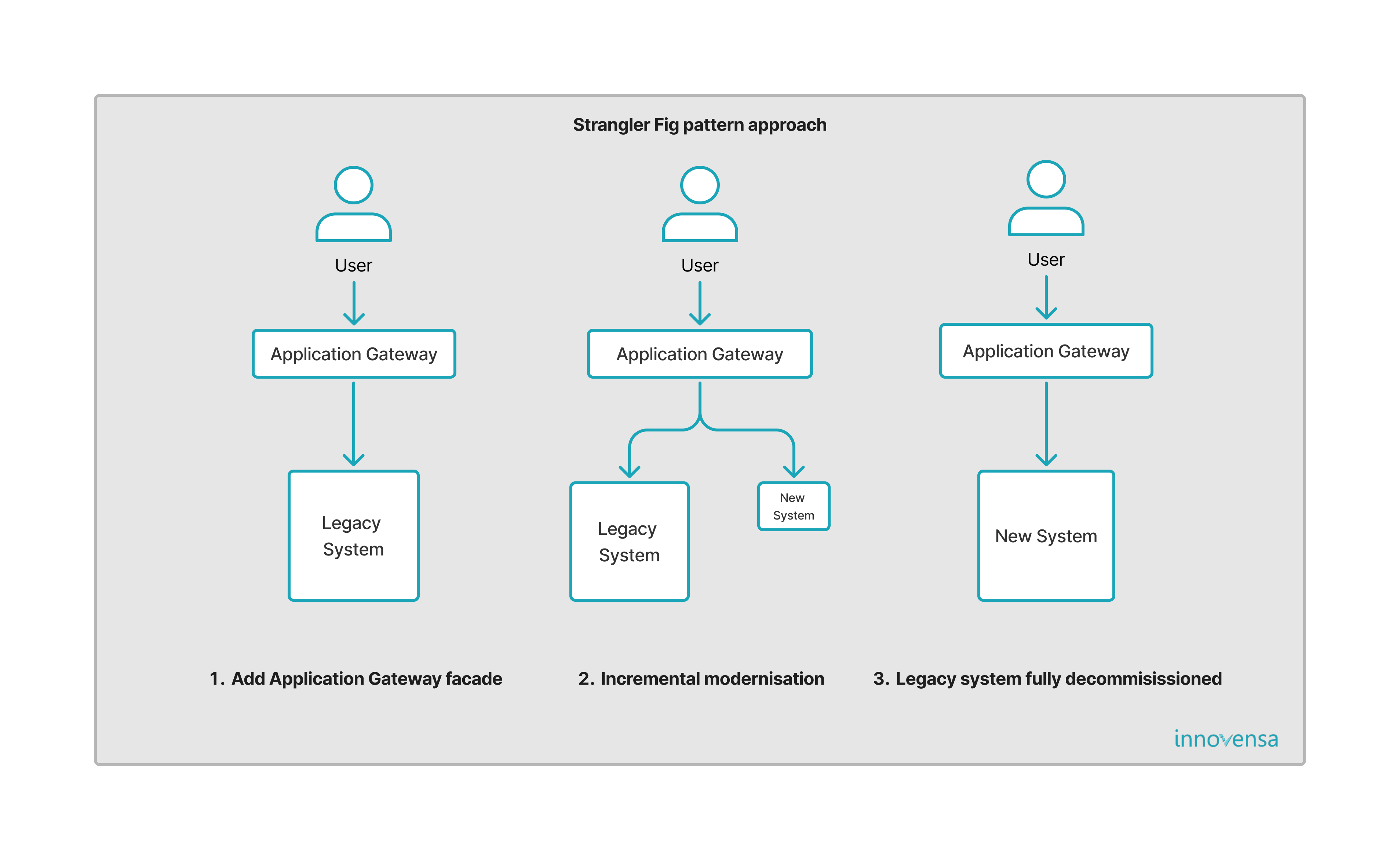
Instead of rewriting the whole logistics system, you place a routing proxy (a "Traffic Cop") in front of the legacy app, initially routing 100% of traffic to the old system. Next, you build the new "Driver Dispatch" feature inside a cleanly architected and testable .NET application. If your internal team is bogged down maintaining the old monolith, this is often a great time to leverage expert .NET application development services to ensure the new architecture is built right from day one. Finally, you update the proxy rules so that billing clicks go to the old system, but dispatch clicks route seamlessly to the new app. Users utilise both systems simultaneously without noticing, allowing you to slowly extract modules over time.
5. Automate the "Magic" Deployments
If your system requires a developer to manually execute SQL scripts, copy .dll files, or right-click "Publish" in Visual Studio, you cannot safely modernise it. Refactoring demands frequent, low-risk deployments, whereas manual deployments are infrequent and high-risk. Before touching the core architecture, codify those "magic" steps into a CI/CD pipeline using tools like GitHub Actions or Azure DevOps. Knowing you can reliably compile, test, and deploy at the push of a button removes a massive amount of stress from your rescue mission.

Conclusion
Rescuing legacy software isn't about writing the cleverest C#; it’s about managing risk. These five strategies are just the beginning of making controlled, incremental changes to maintain or modernise a legacy .NET system.
Don’t be put off if you inherit a complex legacy application. By building a test safety net, making small controlled changes, ensuring code is testable, and automating your deployments, you can transform a terrifying legacy system into a manageable one. With patience, care, and the right workflow, any codebase can be brought under control to meet your business needs.
What’s the scariest part of your .NET codebase?
If you’re tired of manual deployments, missing tests, and constant fear of breaking the system, let’s talk.
At Innovensa, we specialize in rescuing complex systems. Whether you need a comprehensive .NET Legacy Software Audit to understand what you're dealing with, or expert .NET Development Services to help you rebuild safely, we can help you regain control.
1: Feathers, Michael C. (2005). Working Effectively with Legacy Code